 Kazoo
Kazoo
Kazoo
Kazoo
Charades, flipped
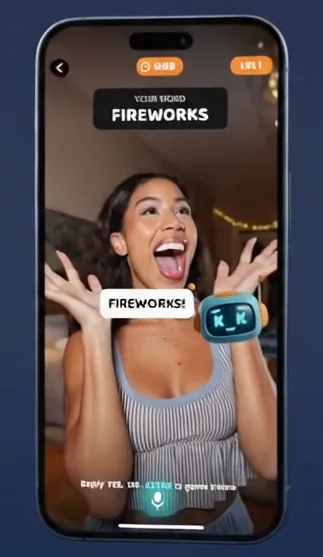
Prop up your phone, perform the word, and watch Kazoo shout its guesses out loud — in real time. No teammate required.

See it in action
Prop the phone, go big — Kazoo shouts its guesses out loud in real time.
The AI reads your acting through the camera — no teammate needed.
Movies, animals, actions and more — family-friendly and always fresh.
Referee mode hears the room — perfect for head-to-head charades.
Chase high scores and rematch instantly — one more round, always.
Three steps, no teammate required.
Stand your phone up so the front camera sees you, then pick a word from a deck.
Use big gestures — no talking, no spelling. Kazoo watches and guesses aloud.
Say "yes," "no," or "close" to steer the AI. Beat the clock and build streaks.
Solo or with a room full of people.
You act, the AI guesses. How many can you land before time runs out?
You and friends race the AI to guess first. Humans vs machine.
Player vs player, with Kazoo refereeing by ear — no camera needed.
One relentless clock, or fast 30-second rounds for frantic fun.
Every game night looks different
One player, one robot, zero mercy. Act it out and see how many you can land.
Everyone races the AI to guess first. Humans vs machine — winner takes the point.
Head to head, big gestures, and Kazoo refereeing by ear.
30-second rounds, confetti, chaos. The whole room plays.
Weekly, monthly, or yearly — cancel anytime in Settings → Subscriptions.
Quick answers to the things people ask most.
In camera modes, the AI looks through your front camera to guess what you're acting out. The microphone lets you say "yes," "no," or "close" to guide it, and lets referee mode hear guesses. You're asked for each permission only when a mode needs it, and you can change them anytime in your device Settings. See our Privacy Policy for the details.
No. Front-camera frames are sent for real-time processing to generate the AI's guess and are then discarded — they're not stored or tied to your identity. Your voice is processed on your device.
Kazoo Pro is billed through Apple. Open Settings → your name → Subscriptions on your device, tap Kazoo, and cancel. You'll keep access until the end of the current period. Deleting the app does not cancel the subscription.
Sign in with the same Apple ID you used to subscribe, open Kazoo, and use "Restore Purchases" on the Pro screen. Your subscription will reactivate.
Yes — the word lists are kept clean and it's rated for all ages. It's a great fit for family game night, classrooms, and parties.
Nope. There's no sign-up or login — open the app and play. Kazoo never asks for your name or email.
Party-game ideas, AI behind-the-scenes, and Kazoo updates.
Same Kazoo. New game. Now on iPhone and Android.
Kazoo Sketch swaps the camera for a canvas. Pull a word, draw against the timer, and the same Kazoo watches your canvas and guesses out loud. Play solo, pass the phone round the room, or open a room for friends online — no camera, no microphone. Free on both the App Store and Google Play.
Launch news, new decks, and new games — a couple of emails a year, no spam.
Prefer a reader? Subscribe via RSS
Questions, bugs, feedback, or help with a Kazoo Pro subscription — we're happy to help. Email us and we'll get back to you, usually within 2–3 business days. Including your device model and iOS version helps us help you faster.
✉ hello@charadesvsai.comOctag AI LLC · maker of Kazoo Charades vs AI